Overview
TeamFlow is a full-featured work management platform built to demonstrate production-ready full-stack engineering skills. It delivers secure authentication, three-tier role-based access control, real-time WebSocket collaboration with live presence indicators, complete task management, and a polished user experience — all deployed and QA-verified.
v1.0
Production Ready
11+
Features Shipped
8
Technologies
Features delivered:
- JWT authentication with NextAuth v5 and password reset
- Three-tier RBAC (Admin / Manager / Member) via CASL
- Real-time WebSocket updates via Socket.io + Redis adapter
- Live presence indicators showing who's online
- Team and project management
- Kanban board with dnd-kit drag-and-drop
- List view with sorting and filtering
- Optimistic UI with automatic rollback (React 19 useOptimistic)
- Comment threads on tasks
- Comprehensive audit logging (timestamp, user, IP, user agent)
- Activity feed with pagination
- Command palette (Ctrl+K)
- Demo workspace with seed data (10 users, 3 projects, 50+ tasks)
- Responsive design with dark mode
Problem
Modern distributed teams need real-time visibility into project progress and task ownership. Existing project management tools often fall short in providing:
- Real-time transparency: Teams can't see who's working on what right now without manually checking
- Granular permissions: Most tools have basic admin/member roles, lacking the flexibility for manager-level permissions
- Instant updates: Polling-based updates create lag and inconsistencies across team members
- Audit trails: Limited visibility into who made what changes and when, critical for accountability
Solution
TeamFlow addresses these challenges by implementing a full-stack SaaS application from scratch, demonstrating production-level engineering patterns:
- Three-tier RBAC: Admin, Manager, and Member roles with granular permissions using CASL enforced at multiple layers
- Comprehensive audit logging: Every action is tracked with timestamp, user, IP address, and user agent for full accountability
- Complete task management: Kanban boards, list views, filters, search, comments, and drag-and-drop organization
- Production infrastructure: Monorepo architecture, Docker containerization, CI/CD pipeline, and API documentation
- Demo workspace: Pre-seeded data allows recruiters to explore immediately without setup (login: demo1@teamflow.dev / Password123)
Architecture
TeamFlow uses a modern, scalable monorepo architecture designed to showcase both frontend and backend expertise:
Browser (Next.js Client)
↓ HTTP/WebSocket
Next.js App Router (Server Components + API Routes)
↓ HTTP REST API
NestJS Backend (Controllers → Services → Database)
↓ Prisma ORM
PostgreSQL + Redis
Monorepo Structure (Turborepo):
apps/web- Next.js 15 frontend with App Router and Server Componentsapps/api- NestJS backend with modular architecturepackages/database- Shared Prisma schema and migrationspackages/shared- Shared TypeScript types and Zod schemas
Frontend Stack:
- Next.js 15 with App Router for SSR and routing
- React 19 with Server Components and useOptimistic hook
- NextAuth v5 for session management
- TanStack Query for server state caching
- Socket.io client for WebSocket connections
- React Hook Form + Zod for type-safe forms
- Tailwind CSS v4 for styling
Backend Stack:
- NestJS 11 with modular architecture (Auth, Teams, Projects, Tasks)
- Passport JWT strategy for authentication
- CASL for declarative, type-safe RBAC
- Socket.io with Redis adapter for WebSocket scaling
- EventEmitter2 for domain events
- Swagger/OpenAPI documentation
Data Layer:
- PostgreSQL as primary database
- Prisma ORM with type-safe queries and CASL integration
- Redis for session storage and WebSocket pub/sub
- Database migrations with Prisma Migrate
Key Technical Decisions
| Decision | Rationale |
|---|---|
| Separate Next.js + NestJS vs. Next.js API routes | Demonstrates backend architecture skills beyond Next.js API routes. NestJS provides dependency injection, modular structure, and enterprise patterns that showcase deeper backend expertise. |
| WebSockets over Pusher vs. third-party service | Implementing WebSockets from scratch is more impressive technically than integrating a service. Shows understanding of bi-directional communication, pub/sub patterns, and horizontal scaling with Redis adapter. |
| CASL for RBAC vs. manual permission checks | Declarative, type-safe permissions that integrate with Prisma queries. Centralized permission logic prevents security bugs and makes the system auditable. |
| Redis session + pub/sub vs. in-memory storage | Production-ready, horizontally scalable architecture. Redis pub/sub enables WebSocket messages to work across multiple server instances, critical for real-world deployments. |
| Monorepo with Turborepo vs. separate repos | Shared TypeScript types between frontend and backend prevent API contract drift. Single CI/CD pipeline, easier local development, and demonstrates org-level architecture patterns. |
| Server Components for data fetching vs. client-side only | SSR improves initial load performance and SEO. Demonstrates understanding of Next.js 15 patterns and when to use server vs client components. |
| Optimistic UI with automatic rollback vs. loading states | Instant visual feedback creates a polished user experience. React 19 useOptimistic hook automatically handles rollback on errors, showing attention to UX details. |
Challenges & Solutions
Challenge 1: Next.js 15 + NestJS Production Authentication
Deploying NextAuth v5 behind a reverse proxy introduced subtle auth failures in production that did not occur in local development. Server Components cannot reliably access session state during SSR hydration, and WebSocket JWT validation requires explicit configuration.
Solution: Added AUTH_TRUST_HOST=true to enable reverse proxy header forwarding. Implemented a hydration guard — always check status === 'loading' before acting on session in useEffect or router.push calls. Fixed Socket.IO room join order: join the room before any async Prisma queries to prevent presence race conditions. Verified end-to-end in production with full recruiter flow QA.
Learned: Production deployment surfaces auth edge cases that never appear in local dev. Bleeding-edge framework versions (Next.js 15, NextAuth v5) require explicit trust host configuration behind reverse proxies.
Challenge 2: Multi-Layer RBAC Enforcement
Ensuring permissions are enforced consistently across controller layer, service layer, and database queries without duplicating authorization logic.
Solution: Implemented CASL for declarative, type-safe permissions that integrate with both NestJS decorators (@CheckAbility) and Prisma queries. Guards enforce at controller layer, services verify ownership, and centralized AbilityFactory defines all rules.
Learned: Authorization is easier to audit and maintain when centralized. CASL's declarative approach prevents security bugs from scattered permission checks.
Challenge 3: TypeScript Type Safety Across Monorepo
Initial setup had type drift between frontend API calls and backend endpoints. Changes to backend DTOs wouldn't immediately break frontend builds, causing runtime errors.
Solution: Created a shared package with Zod schemas that both apps import directly from TypeScript source (not compiled). Frontend forms and backend validators use the same schemas. TypeScript compiler catches breaking changes across the monorepo.
Learned: Monorepos enable powerful type safety when structured correctly. Zod provides both runtime validation and static types from a single source.
App Walkthrough
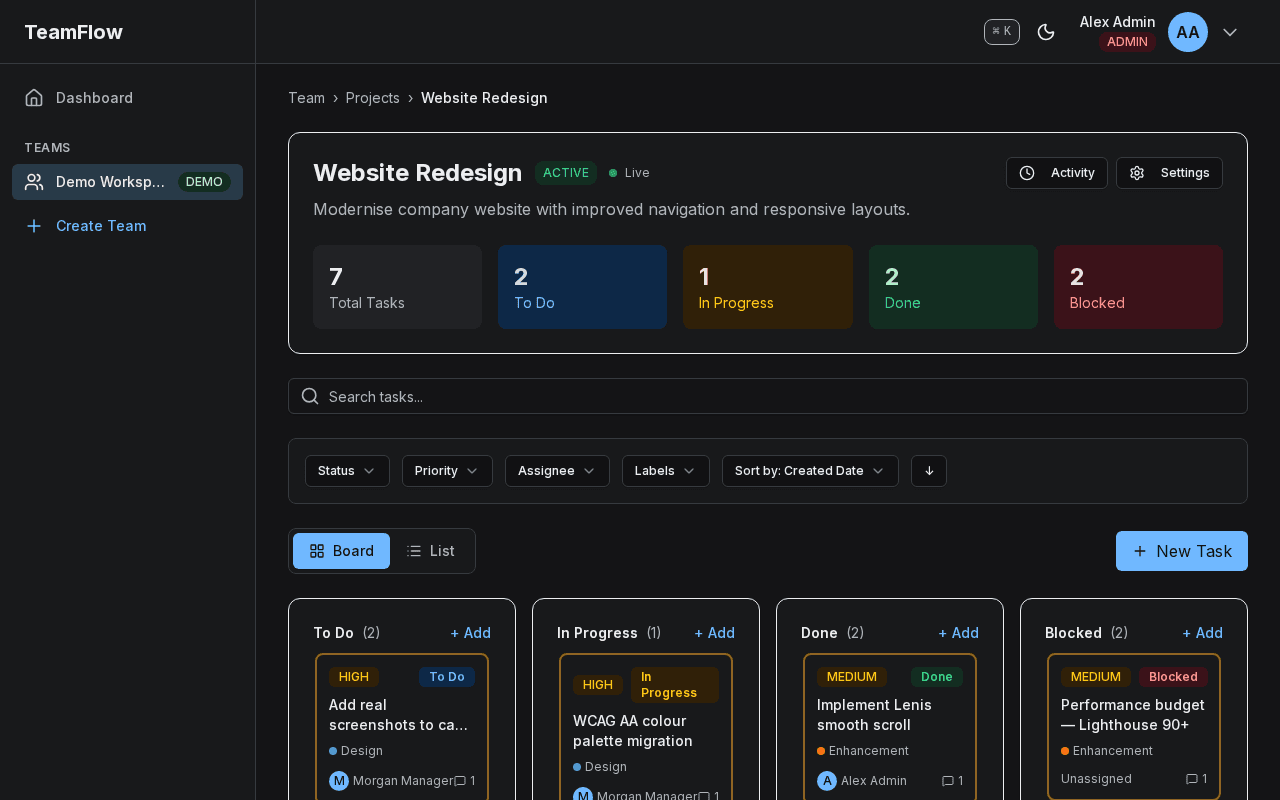
Kanban ColumnsTasks are organized into status columns so the whole team sees work progress at a glance.
Drag-and-DropCards can be dragged between columns to update task status without opening a modal.
Task StatusColumn headers display the status label and card count, giving an instant workload summary.
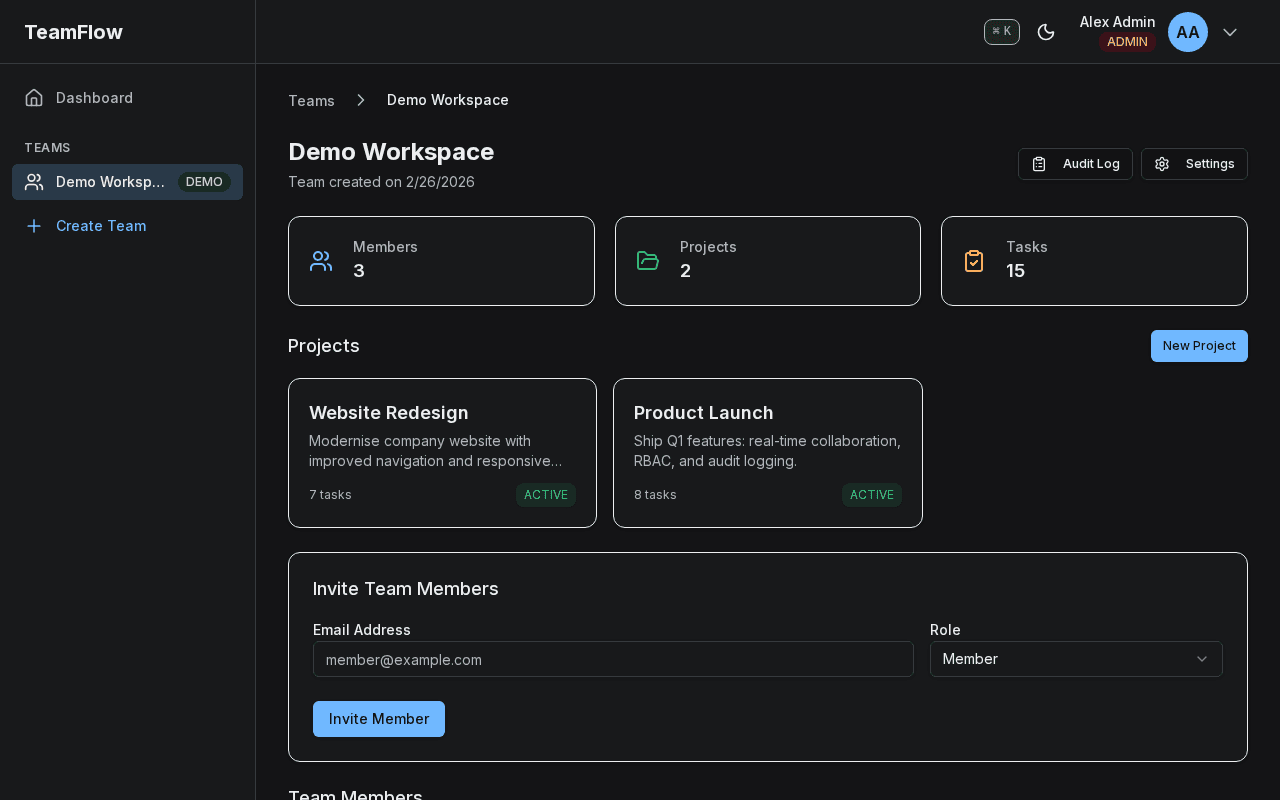
Online IndicatorsGreen activity dots show which team members are currently active in the workspace.
Live UpdatesPresence state updates in real time via WebSocket so availability is always accurate.
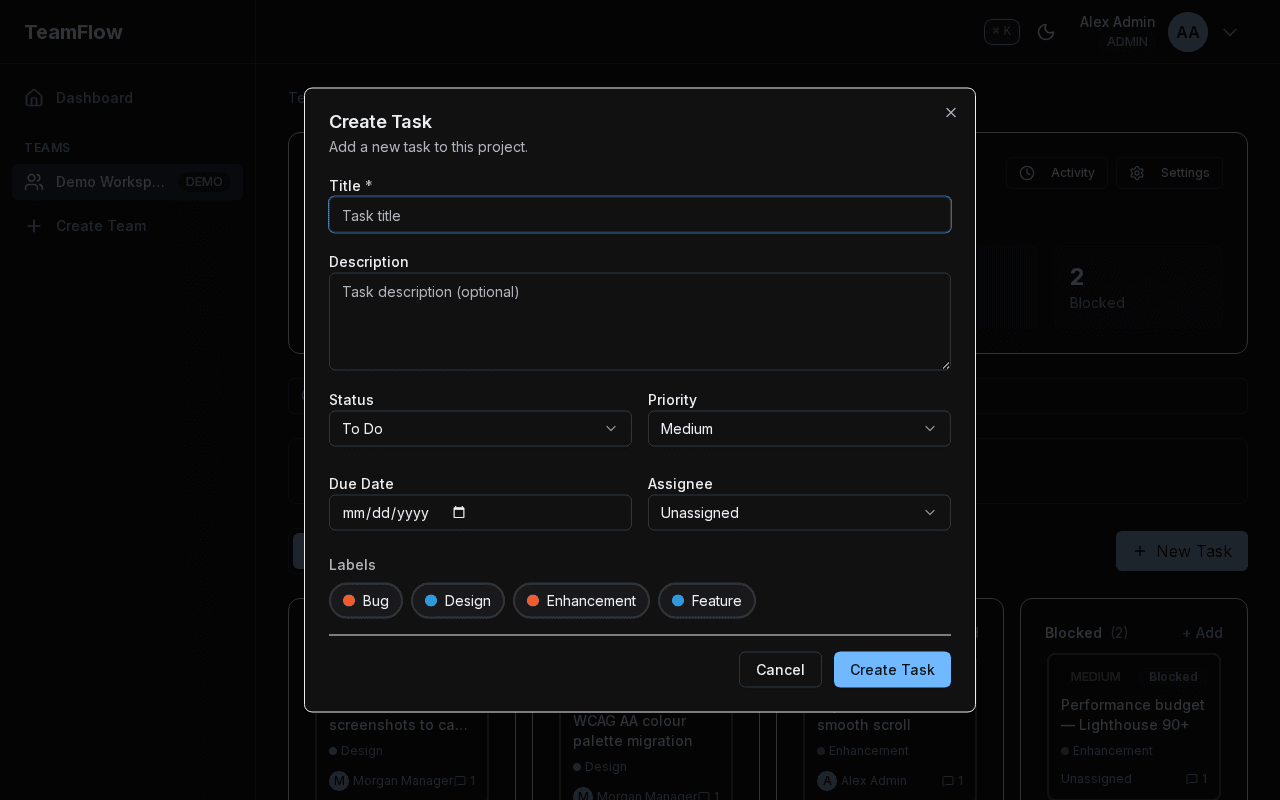
Task TitleA clear title field anchors the task record and appears on the Kanban card.
Assignee SelectionA dropdown lists all workspace members so ownership is assigned at creation time.
Priority LevelPriority tiers (Low / Medium / High) let teams triage and sort the backlog quickly.
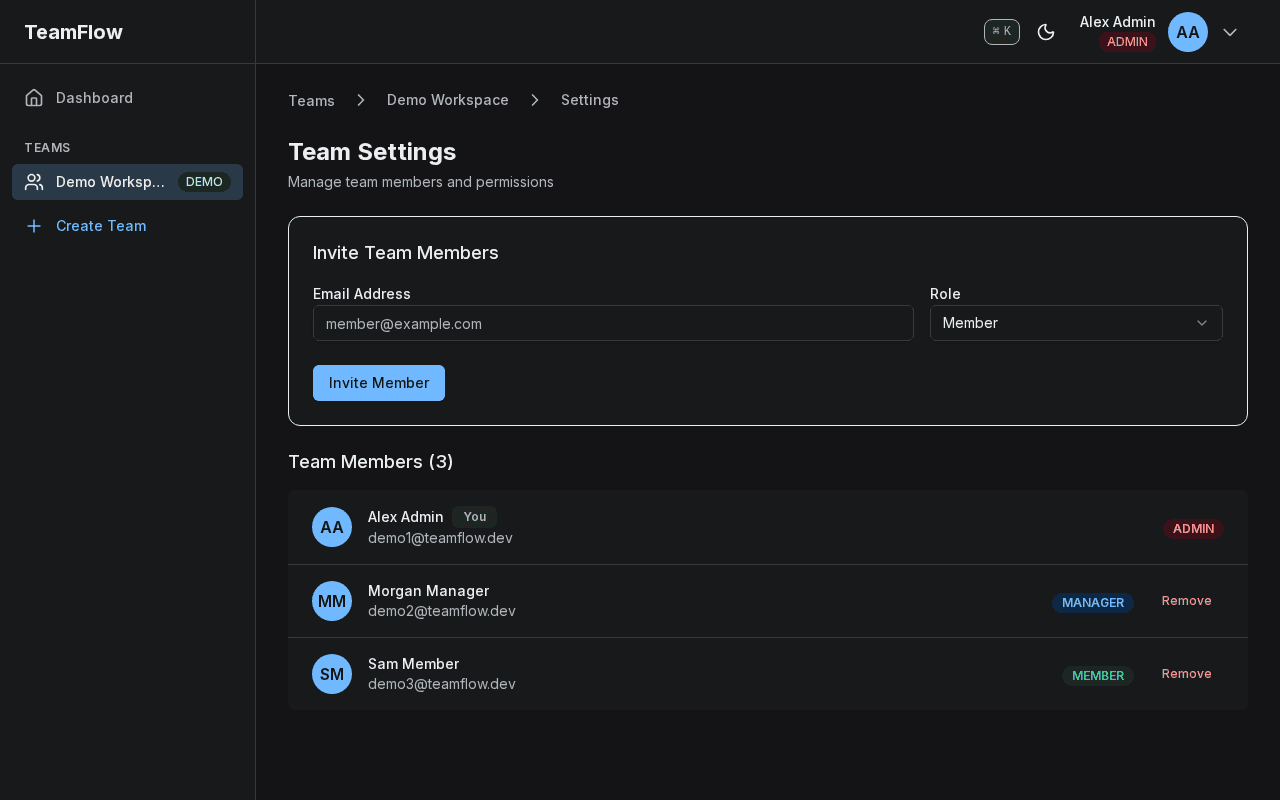
Member RolesEach row displays the assigned role, enforcing who can manage settings or invite users.
Owner BadgeThe Owner role is unique per workspace and cannot be removed, preventing lockout scenarios.
Access ControlAdmins can promote or demote Members, while only the Owner can transfer ownership.
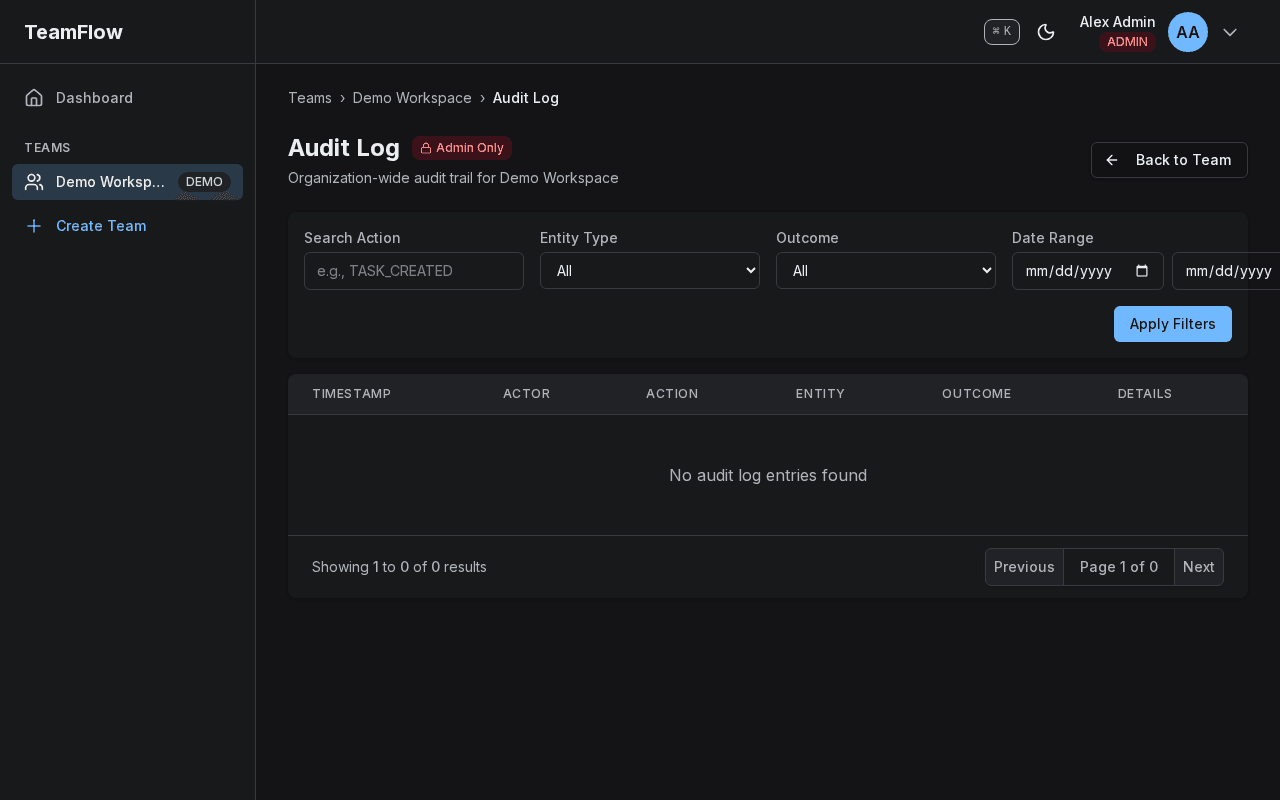
Action LogEvery significant event is recorded so teams can trace changes back to their source.
TimestampsPrecise timestamps show when each action occurred, supporting compliance and debugging.
Actor NamesActor names make accountability clear by linking every change to the person who made it.
Results
TeamFlow successfully demonstrates production-ready full-stack engineering capabilities:
Features Delivered
- ✓ Secure JWT authentication with password reset
- ✓ Role-based access control (Admin/Manager/Member)
- ✓ Real-time task updates via Socket.io
- ✓ Live presence indicators (who's online)
- ✓ Optimistic UI with automatic rollback
- ✓ Team and project management
- ✓ Kanban board with drag-and-drop
- ✓ List view with sorting and filtering
- ✓ Comment threads on tasks
- ✓ Comprehensive audit logging
- ✓ Activity feed with pagination
- ✓ Demo workspace with seed data
- ✓ Responsive design with dark mode
- ✓ Command palette (Ctrl+K)
Technologies Demonstrated
- Next.js 15 App Router & Server Components
- React 19 with modern patterns
- NestJS with modular architecture
- TypeScript full-stack
- PostgreSQL with Prisma ORM
- Redis for caching and pub/sub
- WebSockets (Socket.io) with scaling
- CASL for declarative RBAC
- Docker containerization
- Monorepo with Turborepo
Try the Demo
Experience TeamFlow firsthand with the pre-seeded demo workspace. Login with demo1@teamflow.dev / Password123 and explore all features with sample data including 10 users, 3 projects, and 50+ tasks.